
How to Secure Your Social Media Accounts
Social media has become an essential part of everyday life. From connecting with friends and family to promoting businesses and personal brands, platforms like Facebook, Instagram, X, and TikTok hold massive amounts of personal data.
But with convenience comes risk.
Cybercriminals frequently target social media accounts to steal identities, spread scams, and gain access to private information. Hackers may sell stolen accounts, use them to send phishing messages, or exploit them to spread malicious links.
Because social media accounts are often connected to emails, payment methods, and business pages, a single breach can lead to serious consequences. That’s why securing your social media accounts should be a top priority in 2026.
This comprehensive guide explains the most effective strategies, tools, and security practices to protect your social media accounts from hackers.
Table of Contents
Why Social Media Security Matters More Than Ever
Social media platforms store valuable personal and professional data, including:
- Personal messages and conversations
- Photos and videos
- Contact lists
- Payment information
- Business data and marketing assets
If hackers gain access, they can:
- Impersonate you
- Send scams to your followers
- Steal sensitive information
- Lock you out of your own account
Phishing attacks, fake login pages, and malicious links are among the most common methods used to compromise social media accounts.
Businesses and influencers are especially vulnerable because compromised accounts can lead to reputation damage and financial loss.
Common Ways Social Media Accounts Get Hacked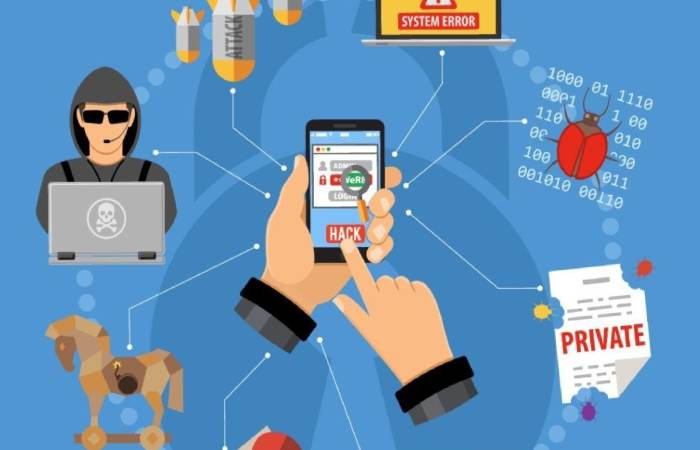
Understanding how attacks happen is the first step to preventing them.
| Threat Type | How It Works | Risk Level |
| Phishing | Fake messages or websites trick users into revealing login details | High |
| Weak Passwords | Easy-to-guess passwords allow brute-force attacks | High |
| Reused Passwords | One breach exposes multiple accounts | High |
| Malicious Apps | Third-party apps gain access to your profile | Medium |
| Public Wi-Fi Attacks | Hackers intercept login credentials | Medium |
| SIM Swap Attacks | Attackers hijack your phone number | Medium |
Many hackers use automated tools to guess weak passwords or exploit reused login credentials across multiple platforms.
Essential Steps to Secure Your Social Media Accounts
Below are the most effective strategies recommended by cybersecurity experts.
1. Use Strong and Unique Passwords
Your password is the first line of defense against hackers.
Weak passwords such as 123456 or password are easily cracked.
Security experts recommend using passwords that contain:
- At least 12 characters
- Uppercase and lowercase letters
- Numbers
- Symbols
Avoid using personal information like:
- Birth dates
- Pet names
- Phone numbers
Reusing passwords across platforms is also dangerous because a breach on one website can expose your social media accounts.
Strong Password Example
| Weak Password | Strong Password |
| john123 | J#9sK!8vLz2@ |
| password1 | Q7#LkP@5$9m |
| petname2024 | T8@vN!2kP4x |
Using a password manager can help you generate and store complex passwords securely.
2. Enable Two-Factor Authentication (2FA)
Two-factor authentication (2FA) adds an extra layer of protection.
Even if someone steals your password, they still need a second verification code to log in.
Common 2FA methods include:
- SMS verification codes
- Authentication apps
- Hardware security keys
Two-factor authentication significantly reduces unauthorized access risks.
Authentication Methods Comparison
| Method | Security Level | Pros | Cons |
| SMS Codes | Medium | Easy to use | Vulnerable to SIM swaps |
| Authenticator Apps | High | Secure and offline | Requires smartphone |
| Security Keys | Very High | Hardware protection | Expensive |
Authenticator apps are widely recommended because they generate one-time passwords directly on your device.
3. Watch Out for Phishing Attacks
Phishing remains one of the most common social media threats.
Hackers often send messages pretending to be:
- Brand collaboration requests
- Platform support teams
- Giveaway promotions
These messages typically contain malicious links designed to steal login credentials.
Signs of Phishing Messages
- Urgent language like “Your account will be suspended”
- Suspicious links
- Requests for login information
- Messages from unknown accounts
Always verify the URL before entering login credentials and avoid clicking suspicious links.
4. Review Your Privacy Settings
Most social media platforms provide privacy controls that limit who can see your information.
Key privacy settings to review:
- Profile visibility
- Tagging permissions
- Direct message restrictions
- Location sharing
Limiting personal information exposure reduces the risk of identity theft and online harassment.
5. Remove Unnecessary Third-Party Apps
Many social media users connect external apps to their accounts.
Examples include:
- Scheduling tools
- Analytics dashboards
- Games and quizzes
Some apps request unnecessary permissions such as posting content or accessing messages.
To stay safe:
- Remove apps you no longer use
- Review permissions regularly
- Avoid unknown applications
Third-party apps can expose your account to security risks if compromised.
6. Monitor Login Activity
Most platforms allow users to review active sessions and device logins.
This feature helps detect suspicious activity quickly.
What to Check
- Unknown devices
- Login locations
- Recent password changes
If you notice unfamiliar activity:
- Log out of all devices
- Change your password
- Enable 2FA immediately
Regularly checking login history helps prevent account takeovers.
7. Avoid Public Wi-Fi for Logging In
Public Wi-Fi networks in cafes, airports, and hotels are often unsecured.
Hackers can intercept login credentials through techniques such as:
- Man-in-the-middle attacks
- Fake Wi-Fi networks
Tips for safer browsing:
- Avoid logging into social accounts on public Wi-Fi
- Use a VPN if necessary
- Log out after using shared devices
8. Keep Your Apps and Devices Updated
Software updates often include important security patches.
Outdated apps may contain vulnerabilities that hackers exploit.
Always Update
- Social media apps
- Browsers
- Smartphones
- Operating systems
Automatic updates help maintain strong security.
9. Be Careful What You Share Online
Oversharing personal information can make accounts easier to hack.
Avoid publicly sharing:
- Home address
- Phone number
- Travel plans
- Birth dates
Hackers often use publicly available information to guess passwords or answer security questions.
10. Educate Yourself About New Threats
Cyber threats evolve constantly.
Following cybersecurity blogs and news sources helps users stay informed about emerging scams and security practices.
Security awareness is one of the best defenses against social engineering attacks.
Social Media Security Tools Comparison
Here are some popular tools used to secure social media accounts.
| Tool Type | Example Tools | Key Features | Price Range |
| Password Managers | Bitwarden, 1Password | Password storage, autofill | Free – $5/month |
| Authenticator Apps | Google Authenticator, Authy | One-time login codes | Free |
| VPN Services | NordVPN, ExpressVPN | Secure internet browsing | $3 – $12/month |
| Security Keys | YubiKey | Hardware authentication | $20 – $70 |
Using a combination of these tools significantly strengthens account protection.
Social Media Security Risk Distribution
Below is an approximate breakdown of common causes of social media hacks.
| Cause | Percentage of Incidents |
| Weak or reused passwords | 40% |
| Phishing attacks | 30% |
| Malicious apps | 15% |
| Public Wi-Fi attacks | 10% |
| Other vulnerabilities | 5% |
Weak passwords and phishing remain the leading causes of account breaches.
What to Do If Your Social Media Account Gets Hacked
If you suspect your account has been compromised, act quickly.
Immediate Actions
- Change your password immediately
- Enable two-factor authentication
- Log out of all devices
- Remove suspicious third-party apps
- Contact platform support
Also inform your followers so they don’t fall victim to scam messages sent from your account.
Best Practices for Businesses and Influencers
Businesses and creators face greater security risks because their accounts often have large audiences and monetization opportunities.
Recommended Security Practices
- Use team access tools instead of sharing passwords
- Enable 2FA for all administrators
- Restrict posting permissions
- Monitor account activity daily
Training team members to recognize phishing attacks is also essential.
Future Trends in Social Media Security
Social media platforms are continuously improving security systems.
Upcoming trends include:
- AI-powered fraud detection
- Passwordless authentication
- Biometric login methods
- Advanced identity verification
These innovations aim to make online accounts more secure while improving user convenience.
Final Thoughts
Social media platforms are powerful tools for communication, marketing, and networking but they also attract cybercriminals.
Protecting your accounts requires a proactive approach that includes:
- Strong passwords
- Two-factor authentication
- Privacy controls
- Awareness of phishing scams
- Regular security audits
By following the strategies outlined in this guide, you can significantly reduce the risk of hacking and maintain full control over your online presence.
Digital security isn’t a one-time task it’s an ongoing process. Staying informed and implementing the latest security practices will help ensure that your social media accounts remain safe in an increasingly connected world.